Parsing and Extracting Ints
Please Log In for full access to the web site.
Note that this link will take you to an external site (https://shimmer.mit.edu) to authenticate, and then you will be redirected back to this page.
1) Understanding Char Arrays
An array of anything in C is referred to by a pointer to its first element. For example, to work with an int array called my_array, the variable my_array is actually a int* pointing to the first element of my_array (my_array[0]). If you were to use the dereference operator * on the variable my_array (so *my_array), it would be the exact same as doing my_array[0].
The same thing applies for arrays of chars.
For example if we have this:
char message[] = "Hi there!"
What this has done is create
9df46e1abec6ee66747a501265dcd4e7Locations in memory are counted in bytes (units of 8 bits). A char is a one byte value, so consecutive memory locations holding a char per location have addresses that are 1 byte apart. Our actual addresses can be large numbers, so we generally need at least 32 bits to represent the address of a memory location. So the address 0x20000 is actually shorthand for the 32-bit address 0x00020000. The actual address where the string is stored can vary.
If we run the following code and look at the resulting printout below the code, we can observe several important details about how chars are stored in memory.
#include<stdio.h>
#include<stdint.h> //if running on computer

char message[] = "Hi there!";

void main() {
  printf(message);
  printf("\n"); //new line
  // sizeof is measured in bytes
  // sizeof is NOT a function...it is calculated at compile time and replaced with a number
  for(int i = 0; i < sizeof(message); i++) {
    int address = (int) &message[i];
    uint8_t value = (uint8_t)message[i];
    char letter = message[i];
    printf("At Location %x is the value %d which is ascii %c\n", address, value, letter);
  }
}
If you run this on your device (and you'll possibly get different memory locations when you run yours), you'll get the following printout:
Hi there!
At Location e038010 is the value 72 which is ascii H
At Location e038011 is the value 105 which is ascii i
At Location e038012 is the value 32 which is ascii
At Location e038013 is the value 116 which is ascii t
At Location e038014 is the value 104 which is ascii h
At Location e038015 is the value 101 which is ascii e
At Location e038016 is the value 114 which is ascii r
At Location e038017 is the value 101 which is ascii e
At Location e038018 is the value 33 which is ascii !
At Location e038019 is the value 0 which is ascii
When you specify a variable type in parentheses in front of another variable this is the traditional way of casting the value into the other form1. This tells C to interpret the data found at those spots in memory as the type you're casting into. Remember everything is stored as just arrays of 1's and 0's in a computer, and it is our interpretation of those 1's and 0's that gives them meaning. The sequence 101010 will mean something different if you're interpretting it as an int or a char. So for example in the line int address = (int) &message[i]; we are converting into an integer ((int)) the value of the address (&) holding the char of interest (message[i]), which would otherwise be a pointer (char *).
From the printout, we can make the following observations:
- The memory locations are each 1 apart because each
chartakes up 1 byte of memory. The sample memory addresses in this printout range from 1073470388 to 1073470397. - Each memory cell holds a value which ranges from 0 to 127. (This is because these originate from specifying ASCII letters which fall within that range.)
- When we convert that value back into a
char(by casting), it becomes the letter again when printed. - Things like the null character can't be printed...but you can see it is null because the value of it is 0!
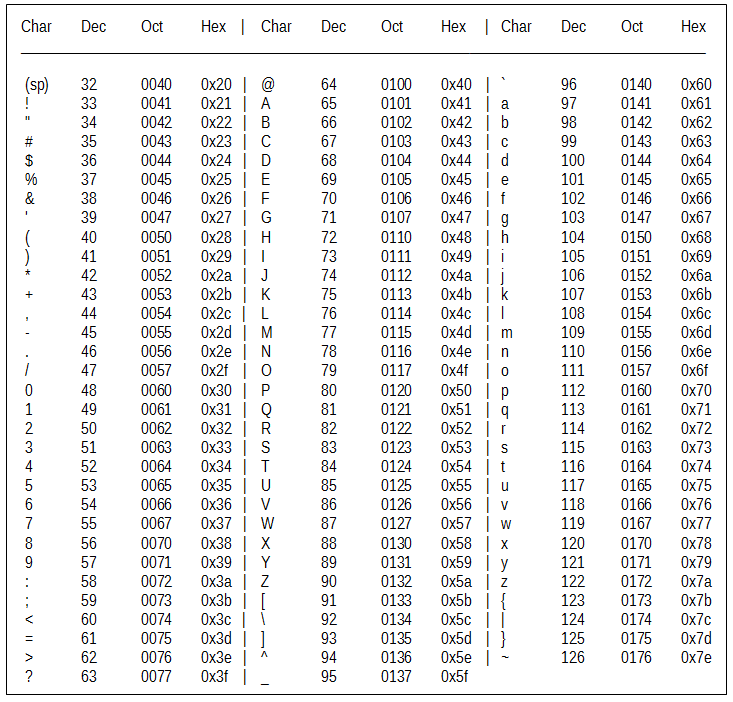
The letters align properly with what a standard ASCII table prescribes!
2) Parsing
When we receive data from a server, it will usually be in the form of a string/char array. However, that data will often have numbers within it that we need to work with. There is a need, therefore, to be able to get our code to stop interpretting the incoming data as an array of character symbols, and instead interpret them as numbers.
If you have a single digit of a char that you wish to convert to an int you actually can't do the following:
char c = '5';
int x = (int)c; //convert c to an integer
print(x); //prints out 53
This is because the value stored in memory for the char '5' in binary is 00110101 or 53 in decimal. When we cast the char to an int, it literally takes the value stored in memory at that spot and reinterprets it as an integer/decimal. That's a bummer.
Thankfully there is a function that already exists to help with this called atoi (doc right here). If you give atoi a char array full of valid numbers, it can interpret it into an integer for you. For example consider the following code snippet (which you can run in your ESP32 environment):
int x = atoi("15");
printf("%d",x+1); //prints 16
x = atoi("-15");
printf("%d",x+1); //prints -14
x = atoi("+1505");
printf("%d",x+1); //prints 1506
x = atoi("abc");
printf("%d",x); //prints 0
printf("%d",x+1); //prints 1
This mostly works as we'd expect. The only thing to be careful for is if non-numbers are fed it returns a 0, so if you are using that number make sure you know where that 0 is coming from (is it actually 0 or not?). Second, atoi expects a char array and not a single char, so be careful on that front as well.
In reading in a string containing numerical information, we'll often also split the numbers using a known symbol. For example, we might receive a char array of the form:
"134&245&111333&89"
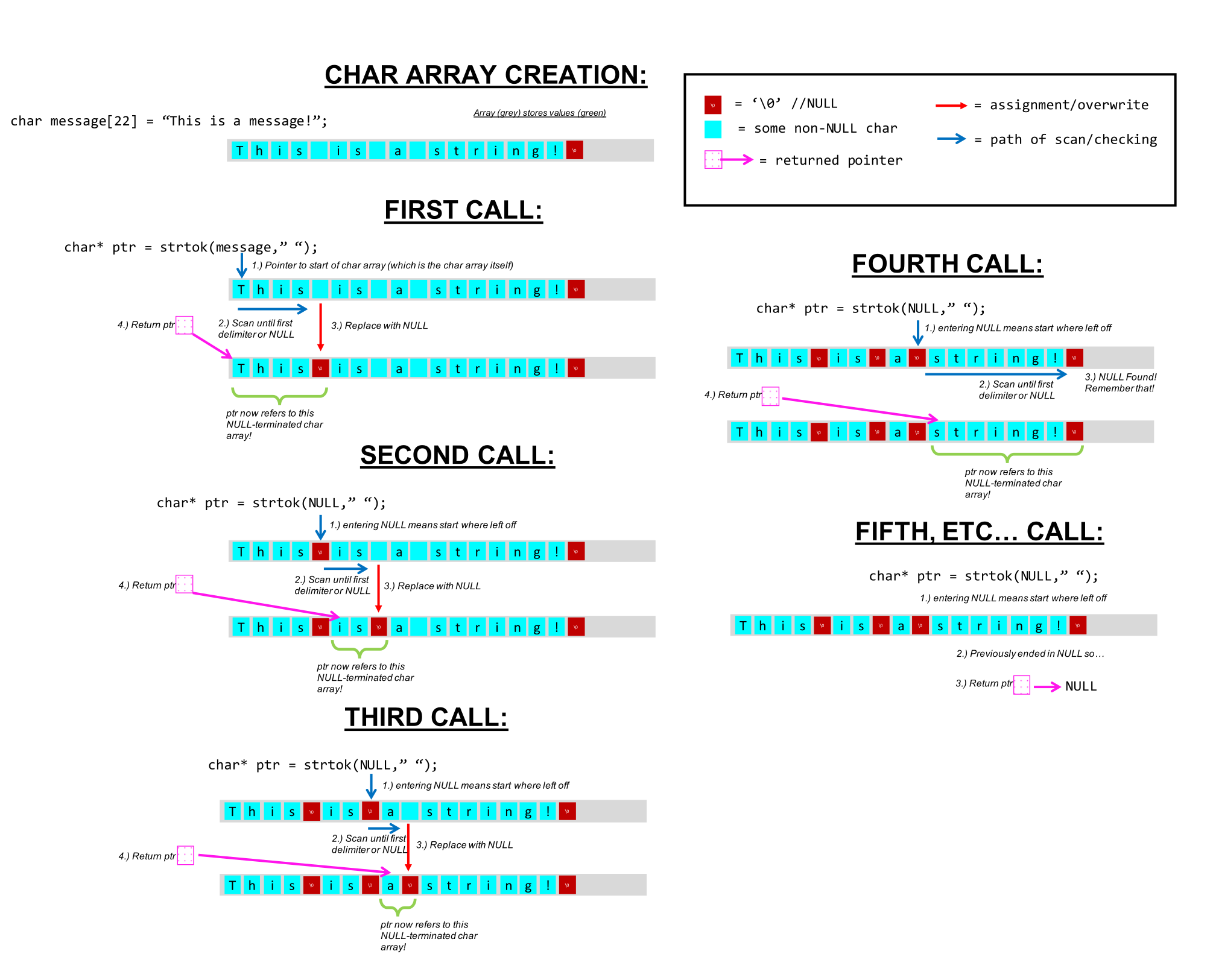
We'd want to split the char array at the & locations and use the chars in between to generate our number. The function strtok which is part of the string.h library can help us with that. The documentation for strtok is here, but a quick summary is that this function can split up a char array on specified tokens. You should take a few minutes to read up on this function and how it works. It is a stateful function, meaning it is designed to be called multiple times.
If you try to pass a char rather than a char * as the second argument to strtok, you will get a compilation error of the form:
invalid conversion from 'char' to 'const char*' [-fpermissive]
This can also occur if you try to use strcat orstrcpy with a single char rather than with a pointer to a char, which is what the actual variable we use to represent a char array is.
3) Some Strtok Practice
Consider the situation where you start out like so:char my_string[] = "Don't Be Suspicious. Don't Be suspicious. Don't be Suspicious. Don't be suspicious.";
char* my_ptrs[10];
int my_addrs[10];
You first run:
int ms_addr = (int)&my_string;
printf("0x%x\n",ms_addr);
and get back:
0xf32f
You then proceed to run:
my_ptrs[0] = strtok(my_string,"b");
my_addrs[0] = (int)my_ptrs[0];
printf("0x%x\n",my_addrs[0]);
What gets printed?

my_ptrs[0] is pointing to a string. What string is it pointing to?
You then proceed to do the following:
my_ptrs[1] = strtok(NULL,"b");
my_addrs[1] = (int)my_ptrs[1];
printf("0x%x\n",my_addrs[1]);
What gets printed now?
my_ptrs[1] is pointing to a string. What string is it pointing to?
Then we have the following:
my_ptrs[2] = strtok(NULL,"b");
my_addrs[2] = (int)my_ptrs[2];
printf("0x%x\n",my_addrs[2]);;
What gets printed now?
my_ptrs[2] is pointing to a string. What string is it pointing to?
We then run this line:
my_ptrs[3] = strtok(NULL,"b");
What value will be stored in my_ptrs[3]?
my_ptrs[3]?
We then proceed to run the following:
my_ptrs[4] = strtok(my_string,"p.");
my_addrs[4] = (int)my_ptrs[4];
printf("0x%x\n",my_addrs[4]);;
my_ptrs[4] is pointing to a string. What string is it pointing to?
4) Assignment
Create a function called int_extractor that has three arguments:
char* data_array: An input char array that contains a string of integers separated by a delimiter. You can assume this is properly null terminated.int* output_values: An integer array to be used as an output to store integers you extract from the input char array.char delimiter: The character you are to use as the delimiter in chopping up the input string.
Use the strtok function to extract the integers embedded in the data_array input string. Note that the second argument to strtok is a char*, pointing to a properly NULL-terminated char array.
You can assume that every char array handed in is properly formatted (no random chars in where numbers should be). You can also assume that output_values will always be large enough to hold whatever is provided by data_array and that delimiter will be found in data_array (if there is data to be extracted). Input data strings will always start with a valid number.
Watch for edge cases like an empty input string.
Consider using code like this as a test platform:
#include<string.h>

int values[10];
void main() {
  char message1[] = "56&14&18&9";
  int_extractor(message1,values,'&');
  for (int i = 0; i<sizeof(values)/sizeof(int); i++){
    printf("%d", values[i]);
  }
  printf("\n");
}
void int_extractor(char* data_array, int* output_values, char delimiter){
    //your code here
}
and test it with different things as needed.
Footnotes
1This is C-style casting. The syntax you'll see in Python, like int(x), is known as functional casting, which is not part of the C standard. Although functional casting works on the course website, it does not work with most C compilers, so you should avoid using it even if your code passes the checkers.