Scrolling Text
Please Log In for full access to the web site.
Note that this link will take you to an external site (https://shimmer.mit.edu) to authenticate, and then you will be redirected back to this page.
This postlab has 1 checkoff at the end that must be received in person during office hours. Make sure to do that and upload your code in order to get full credit!
1) Motivation
As of now, our LED displays can only display messages up to 4 characters long. But most messages are longer than that. Even the MBTA has run into this issue. The solution: scrolling through the entire message.
Just scrolling along.
Today we'll be using our LED array to make scrolling text, like so:
2) Software/Hardware Setup
We'll be using the same hardware setup as we did this week in lab, so if you didn't disassemble anything, you're all set. Otherwise, refer to the lab for how to get that up and running again.
2.1) Starter Code
Download the starter code for today's lab here: [Starter Code]. There will be two files in the src folder:
main.c, your main C file. This file is our "entry point", a file that contains a function which the system will "start" from.ascii.hA header file containing data corresponding to an 8x8 rendering for each ASCII character (same one as you used in the lab).
In addition to the starter code from the website, please copy over 6190.h from lab2. This is the header file that contains definitions of constants and functions specific to our hardware setup.
Make sure main.c,6190.h, and ascii.h are in src.
If you haven't done so already, add the line #include "ascii.h" at the top of your 6190.h file, on line 3.
IMPORTANT: YOU ARE NOT ALLOWED TO IMPORT ANY ADDITIONAL LIBRARIES, INCLUDING string.h.
3) Message Length
A key piece of information we'll need is the length of the message (as defined by the number of characters, NOT including the null-terminating character).
Your first task is to write a function that will calculate this.

Implement messageLength(). It takes in one argument:
char *message: A null-terminated char array.
It returns an integer indicating the number of characters in the array, not including the null-terminator.
Once you have something working in the below checker, paste it into messageLength() in your main.c.
4) Slide to the Left
In the lab, you wrote a program that printed out a static image on the LED display:
- You took a string (that we had entered into the system via switches) and rendered each character as an 8x8 image using the mapping in
ascii.h. - We then displayed the entire string by filling up the
screen_bufferwith four of these 8x8 characters, then callingdrawBuffer()to transmit the data in the screen buffer to the display.
Let's say we have the string: "PEACE". From the lab, we know how to render the first four characters.
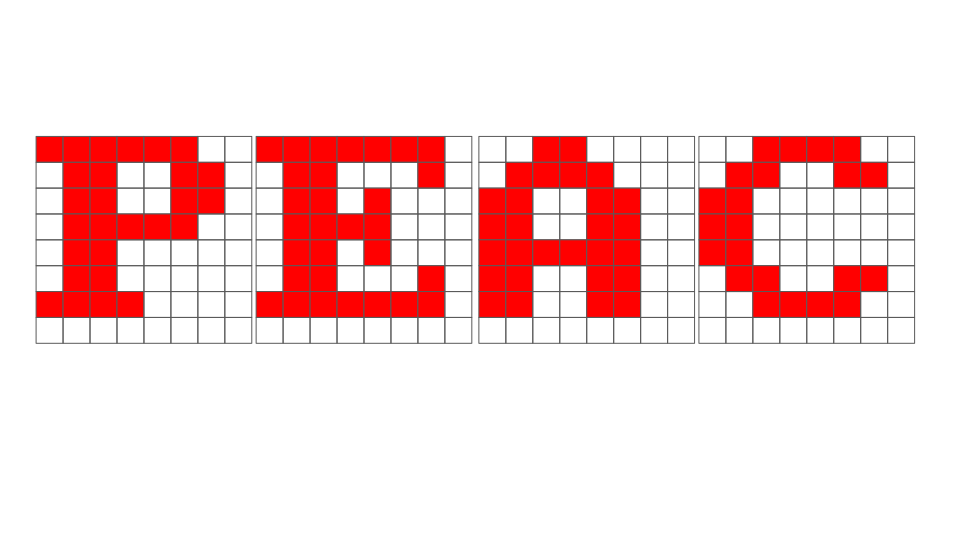
Today, we want this string to scroll across the LED display from right to left. Exciting. Dynamic. But, how do we do that? The high-level idea is that on every timestep, we just want to move our message on spot to the left on the LED display. In the case of "PEACE":
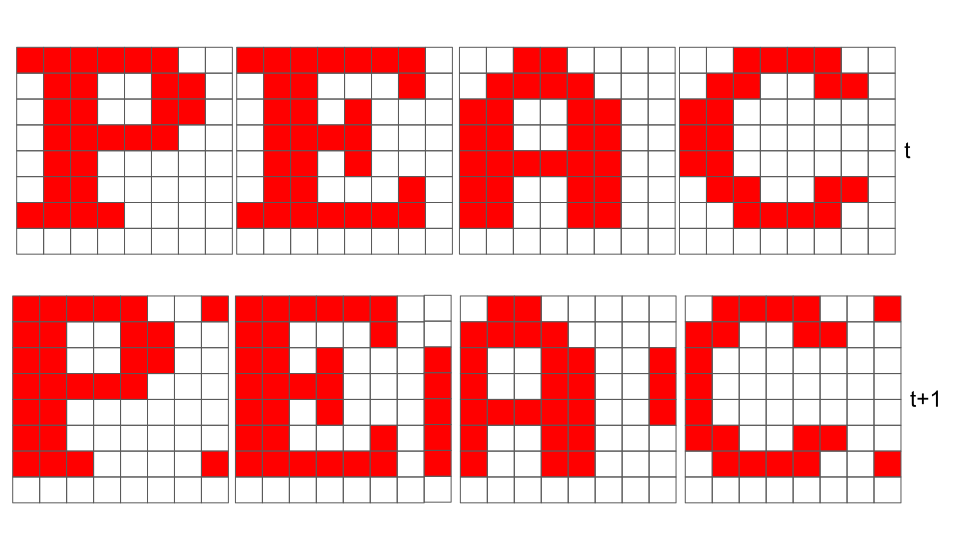
So every pixel in the LED array shifted to the left by 1. This is the general behavior we want out of our system. On each time-step, we shift our image one column to the left. Our program does this continuously, and it appears as though our text is scrolling. Before we get into implementation, we should point out some things.
In the lab, we displayed 4 characters, which fit perfectly in our 32-bit wide screen buffer (since we had four character renderings, each 8-bits wide). With scrolling text, we will often (actually, 87.5% of the time) find ourselves in a situation like this, where things don't line up perfectly:
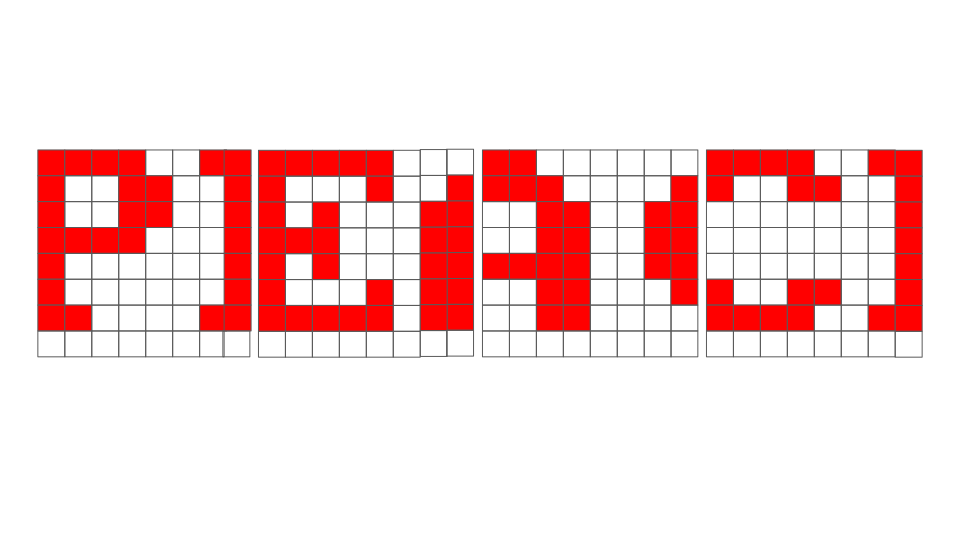
The above image highlights two main differences from our draw_ascii_string function in lab2:
- We need renderings of 5 characters (P, E, A, C, and E), rather than just 4.
- We are only displaying portions of two of the characters.
Now let's do it.
5) Scrolling Text
5.1) fillScreenBuffer()
The main task today will be to implement fillScreenBuffer(). It takes in two arguments:
char *message: The message we want to make scroll across the screen.int total_offset: This is how "far" we are from the beginning of the message. This is defined by the number of times that we have shifted the message to the left. We will use this to determine what portion of the message to display on a given time-step.
For example, if message is "PEACE", like here:
total_offset would be 0 in the top image (at time t) and total_offset would be 1 in the bottom image (at time t+1). As shown in the starter code, we have reached the end of the message when total_offset == message_length * 8.
We are going to want to use total_offset to help us determine what characters (and what portions of characters) we will want to be displaying on our LED array on a given time-step. Let's answer a couple of questions that can give us an idea of how exactly to do that.
The following questions expect a syntactically-correct line of C code (so make sure you include a semicolon, for example).
total_offset to calculate which index the leftmost (partially or completely) rendered character corresponds to in the string message. Assign it to a (already-declared) variable named val (in the above example where message is "PEACE", for example, val would evaluate to 2 if A were the first rendered character).
total_offset (as defined above) to calculate the number of times that we have shifted our message to the left since the last time exactly four characters line up perfectly on the screen, and assign it to a (already-declared) variable named val.
Your implementation of fillScreenBuffer() can be broken down into a few steps:
- Determine what characters in the message should be displayed on a given time-step. You may find it helpful to use your answer to one of the questions above.
- Get the 8x8 renderings of those characters from the
asciiarray. - Position each character rendering in
screen_bufferThis step will be similar to what you did in lab 2, but now you need to account for the fact that the characters may not line up perfectly in each 8x8 box. You may find it helpful to use your answer to one of the questions above.
Implement fillScreenBuffer() in the checker below.
Once you have something that passes, copy and paste your implementation into fillScreenBuffer() in your main.c. Compile the project and flash it. If things went well, you'll have yourself some scrolling text.
6) Code Upload
Make sure to submit your main.c and 6190.h files in a zip file named None_postlab2.zip.
To create the zip file, you can select the folders/files you want, right click, and look for the option to compress these files.
Alternatively, you can run one of the following commands in the terminal:
If you're on MacOS or Linux or Command Prompt:
zip None_postlab2.zip src/6190.h src/main.c
or for Windows Powershell users,
Compress-Archive -Path src/main.c,src/6190.h -DestinationPath None_postlab2.zip
main.c and 6190.h files here as a zip file: Name the file None_postlab2.zip for this assignment.
7) Checkoff
Once you've completed the postlab, please make sure you get a checkoff during office hours in order to get credit.
Show your scrolling text program working with your favorite (respectful) word/phrase.