Quicksort
Please Log In for full access to the web site.
Note that this link will take you to an external site (https://shimmer.mit.edu) to authenticate, and then you will be redirected back to this page.
1) Hardware Setup
You will need your LED display to be wired up like it has been, so we can visualize our quicksort in action.
2) Software Setup
You can find the starter code for today's postlab here: [Starter Code]. In the project's \src folder you'll find:
main.c: your main C file. This file will still be our "entry point". Today, you should NOT modify this file, it merely serves as a "wrapper" for our assembly code.quicksort.S: assembly (.S) file where you will implement your quicksort.
You should also copy over gpio_asm.S and 6190.h from lab5 and place them both in the src directory. Make sure that you're copying the 6190.h that you were using in Lab 5, and do not modify anything in either of these files for this postlab.
In PostLab 4, we saw one way to sort an array of numbers: Bubblesort. Bubblesort is fairly simple to implement, but is not very efficient unless the (1) input array is tiny or (2) the array is almost sorted to begin with. Quicksort is a different sorting algorithm that's more complex but usually gives better performance.
3) Quicksort
In Bubblesort, the array is sorted one element at a time, moving it further up the array until it was in the right position. Quicksort uses a divide-and-conquer approach with three key steps:
- A pivot is selected, often just the first or last element in the array (in your implementation you'll use the last element).
- The elements of the array are rearranged (or partitioned) into two sub-arrays: all the elements less than or equal to the pivot and all the elements greater than the pivot.
- Each of the sub-arrays is recursively sorted using the same quicksort procedure.
3.1) Visual
The below visual shows quicksort graphically.
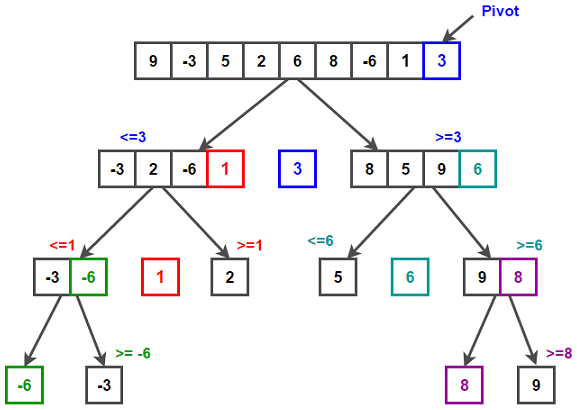
3.2) Example C Implementation
int partition(int* p, int start, int end) {
    int x = p[end]; // select pivot
    int tmp, i = start - 1;
    for (int j = start; j < end; j++) {
        if (p[j] <= x) {
            i++;
            tmp = p[i];
            p[i] = p[j];
            p[j] = tmp;
        }
    }
    tmp = p[i + 1];
    p[i + 1] = p[end];
    p[end] = tmp;
    return i + 1;
}

void quicksort(int* p, int start, int end) {
    if (start < end) {
        int q = partition(p, start, end);
        quicksort(p, start, q - 1);
        quicksort(p, q + 1, end);
    }
}
The quicksort function expects three arguments:
- the starting address of an array of words to be sorted (in
a0), - the starting index of the region to be sorted (in
a1), - the ending index of the region to be sorted (in
a2),
Note that the starting index and ending index are element indices, not addresses or byte offsets.
4) Implementation
Your task is to translate this function into assembly. Your implementation of quicksort should be recursive. You may use any registers you'd like, except for gp and tp. Make sure that you follow calling convention!
We have provided separate checkers for partition and quicksort so you can test each part independently, assuming the other part is correct.
4.1) Partition
partition function is being tested using an implementation of quicksort as a wrapper. As a result, an incorrect implementation of partition can result in an infinite loop in the test case. If you're getting an "infinite recursion" error, this is likely due to partition returning the incorrect value. You can use the debugger to determine if that's the case.

Once that's working, paste your implementation into quicksort.S, under the partition label.
4.2) Quicksort
We have provided you with an implementation of quicksort that does not following RISC-V calling convention. You can assume that it will work as expected if it follows calling convention. Modify the procedure so that it follows RISC-V calling convention.
Here is the starter quicksort code again in case you need to start over:
quicksort:
    bge     a1, a2, done
    call    partition
    addi    a2, a0, -1
    call    quicksort
    addi    a1, a1, 1
    call    quicksort
done:
    ret
Once that's working, paste your implementation into quicksort.S, under the quicksort label, and then proceed to section 4.3 for the final part of the postlab before the checkoff.
4.3) Watch and Learn
Now let's watch the algorithm in action! We want to visualize our quicksort implementation on the LED display. Call the procedure, arrayViz, (it has already been defined for you) wherever the algorithm modifies the array. Make sure to adhere to calling convention!
arrayViz function definition in the provided code!Once you've done that, upload your program to the board. If you have correctly placed the arrayViz procedure call(s), and you followed calling convention, you should see something like this:
If your program doesn't work as expected on the board, check your calling convention!!
5) Code Submission
Please submit your quicksort.S file in a zip file named None_postlab5.zip before asking for a checkoff.
To create the zip file, you can select the folders/files you want, right click, and look for the option to compress these files.
Alternatively, you can run one of the following commands in the terminal:
zip None_postlab5.zip src/quicksort.S
or for Windows Powershell users,
Compress-Archive -Path src/quicksort.S -DestinationPath None_postlab5.zip
quicksort.S as a zip file: Name the file None_postlab5.zip
6) Checkoff
Show your quicksort running on your microcontroller. IMPORTANT: If your implementation seems choppier than the video or shows multiple elements switching when the display changes, double check that you put arrayViz into the correct function.