Dynamic Memory
Please Log In for full access to the web site.
Note that this link will take you to an external site (https://shimmer.mit.edu) to authenticate, and then you will be redirected back to this page.
1) An Endless World
In lab, the world was a fixed array: uint32_t world[64]. Sixty-four rows, always there, whether you drew on them or not, and a solid wall when you scrolled past the top or bottom.
For the postlab we'll make it endless in the vertical direction. Draw as far up or down as you like, and the world grows to fit. To do it we'll move the world from a fixed array onto the heap, using malloc, realloc and free.
The only file that changes is world.c. Remember that draw.h and main.c only ever touch the world through worldGet, worldSet, worldHasRow, worldReset and worldDump. So as long as the new world.c provides those five functions, your flood fill, cursor and display code from lab will/could/should work on the new world without changing a single line.
2) Getting Started
Download the new world.c from here and use it to replace the world.c in your lab project. (Remember to keep a copy of your old one if you'd like to switch back.) Everything else in the project stays as it was at the end of lab (so you'll be re-using the same project folder as lab 6).
3) The New World
The world is now one block of rows on the heap, plus a little struct that says where the block is:
struct world {
    int ystart; // the world row that rows[0] is
    int nrows; // how many rows the block holds
    uint32_t *rows; // nrows uint32_t's on the heap, or NULL when the world is empty
};

struct world W = {0, 0, NULL};
The block covers world rows ystart through ystart + nrows - 1: W.rows[i] is world row ystart + i. Any row outside the block is blank. The world starts out empty, with no block at all.
Why do we need ystart? For the postlab, you'll only have memory allocated for a row if it's in the range of the drawn world (i.e, if the row's y location is between the lowest and highest y value of the drawn pixels). So the ystart of this world will just be the y value of the lowest pixel (meaning this lowest value won't be fixed at y=0, since it will only depend on the y value of said lowest drawn pixel).
Note that we don't allocate memory when our cursor moves to a new row: in the world.C code provided for you, growRows only gets called when we are drawing on a new row. .
So if the drawn pixel with the lowest y location is located at y = -2, then W.ystart would become -2. If W.nrows = 6, then the world's range would be y=[-2,3]. Because we have no walls, this all depends on where the pixels are drawn.
When you draw on a row the block doesn't cover yet, the block has to grow to reach it. Growing at the bottom (towards larger y) is easy: make the block longer, and the new rows go on the end. Growing at the top is the interesting one, because the new rows have to go at the front:
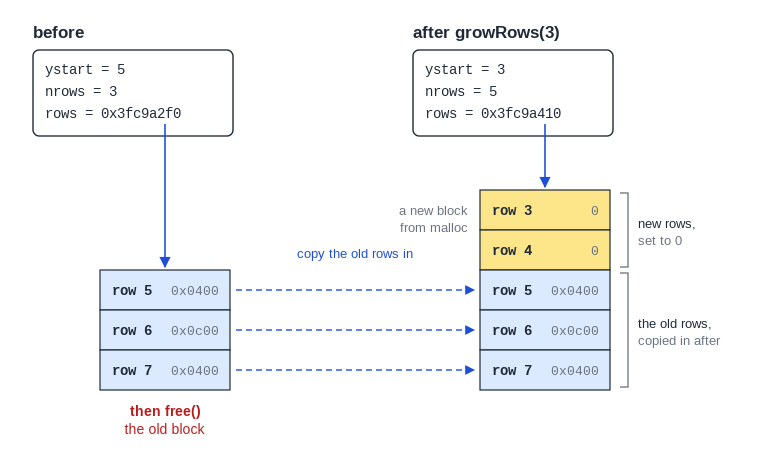
As per the above figure, when drawing on a new pixel that is outside of the range of the allocated rows, you should make sure to allocate enough memory for the new row and any other rows between that new y location and the previous end of block. So if your world previously ranged from [5,7]. Drawing a pixel at row with y=3 means you would have to allocate rows {3,4} in memory, not just row 3. Keep that in mind when growing W.rows.
Most of world.c is given: worldGet, worldSet, worldHasRow (which now always returns 1, since any row can exist) and worldDump. worldSet calls growRows before it draws, and whenever the world grows it calls worldDump so you can watch it happen. You write the two functions that deal with the heap.
4) growRows
growRows(y) makes the block cover world row y, and returns 0. There are four cases, and growRows (which is given) just figures out which one you're in and hands it off to a helper:
int growRows(int y) {
    if (W.nrows == 0) {
        return newWorld(y);
    } else if (y < W.ystart) {
        return expandFront(y);
    } else if (y >= W.ystart + W.nrows) {
        return expandBack(y);
    }
    return 0;   // already covered: nothing to do
}
- The world is empty (
nrowsis 0):newWorld(y)makes a block of one row, set to 0, and makesystartbey. yis past the last row:expandBack(y)usesreallocto make the block longer, and sets the new rows at the end to 0.yis beforeystart: the new rows have to go in front of the old ones, whichrealloccan't do. SoexpandFront(y)usesmallocto get a new, bigger block, sets the new front rows to 0, copies the old rows in after them,frees the old block, and changesystart.yis already covered: nothing to do.
You write these three helpers.
Remember that malloc and realloc take sizes in bytes, and each row is a uint32_t.
malloc and realloc can fail and return NULL. If that happens, your helper should return -1 and leave W exactly as it was, so the world you already drew is still there.
W.rows = realloc(W.rows, ...). If realloc fails, it returns NULL but leaves the old block alone... and you just overwrote your only pointer to it. Put the result in a temporary first, and only update W.rows once you know it worked.The checkers below are picky on purpose. Behind the scenes we've replaced malloc and its friends/relatives with versions that fill new memory with garbage, poison memory once it's freed, move every block when you realloc it, and sometimes just fail. Bugs that would "work" most of the time on the board will show up here so that things will be extra robust.
4.1) newWorld
First up is newWorld().
int newWorld(int y) {
    // The world is empty (W.nrows is 0).
    // Give it a block of one row, set it to 0,
    // with ystart = y. Return 0, or -1 if memory ran out...
    // (and leave W as it was).
    return -1;
}

4.2) expandBack
Next up is the expandBack
int expandBack(int y) {
    // y is past the last row. so Make the block longer with realloc so it reaches
    // row y, and set the new rows at the end to 0. Return 0, or -1 if memory
    // ran out (and leave W exactly as it was).
    return -1;
}
4.3) expandFront
Finally we'll do expandFront().
int expandFront(int y) {
    // y is before W.ystart. Make a new, bigger block that starts at row y:
    // new rows (set to 0) at the front, then the old rows copied in after them.
    // Free the old block, and update W.
    // Return 0, or -1 if memory ran out
    // (and leave W exactly as it was).
    return -1;
}
5) worldReset
worldReset() gives the block back to the heap with free, then sets W back to the empty world: rows is NULL, and nrows and ystart are 0. (free(NULL) is allowed and does nothing, so you don't need a special case for an empty world.)
6) Try It Out
Put both functions (and the three helpers for growRows of course as well) in world.c, build and flash. Your drawing program should work just like before, except there's no wall at the top or bottom any more. Draw something, scroll a long way down, and draw something else. Scroll back up and it should still be there. Your flood fill works too, with no changes: a row the block doesn't cover reads as blank, so the fill treats it as empty space.
Every time the world grows, worldDump prints a line like this:
W @ 0x3fc8b114: ystart=4 nrows=3 rows=0x3fc9a2f0 (12 bytes, up to 0x3fc9a2fc)
W itself is a global, so it never moves. The block that rows points to is on the heap, and it can.
7) Watch It Grow
Hold BTNF to start from an empty world. Then do the steps below, and before each step, write down what you think the next dump line will say: ystart, nrows, and whether rows will stay at the same address or move. Then do it and compare.
- Put the pen down where you are (the world grows for the first time).
- Move down 3 rows with the pen down.
- Move up past the top of what you've drawn by 1 row, pen down.
- Lift the pen, move up 10 more rows, and put the pen down.
- Lift the pen, move down until you're past the bottom of what you've drawn, and put the pen down.
rows ever stay at the same address when the world grew? When it moved, what happened to the old block? Why does growing at the front always give rows a new address, while growing at the back only sometimes does?
8) A Leak on Purpose
Holding BTNF prints the free heap, calls worldDump and your worldReset, then prints the free heap again. Draw on a bunch of rows and hold BTNF. Do that two more times. With a working worldReset, the free heap after each reset should come back to the same number every time.
Now comment out the free in your worldReset, build, flash, and do the same thing three times. Write down the free heap after each reset.
Put the free back when you're done!
nrows × 4 bytes, from the dump). Do they match exactly? If not, where do the extra bytes come from?
9) Checkoff + Kit Return
Show a staff member your endless world working, including drawing far above and below the start. Then show your predictions and dump lines from Watch It Grow, and explain when rows moved and why growing at the front always moves it. Last, show the free heap numbers from your leak, and explain where the memory went.
10) Code Submission
Please submit your world.c in a zip file named None_lab6_postlab.zip before asking for a checkoff.
Here's a command that you can run in your terminal:
zip None_lab6_postlab.zip src/world.c
or for Windows Powershell users,
Compress-Archive -Path src/world.c -DestinationPath None_lab6_postlab.zip
world.c as a zip file: Name the file None_lab6_postlab.zip